Category: Apps & Abouts

GPS app or Budget calculator is something you don’t need to pack, but it should be on your list. Travel apps will help you track your travel expenses and find your way on a new city.

  • Top 5 Travel Budget Apps to track your Trip Expenses

    Top 5 Travel Budget Apps to track your Trip Expenses

    Traveling can be wonderful only if you can enjoy every moment of your trip, starting from planning to getting home safe and sound, and not broke of course. This is why it’s really important to think about your travel budget and here it comes some travel budget apps you can use to manage your expenses and enjoy your travels.

    Every travel has it’s own budgeting tips, plans and a way of spending. In order to calculate and track travel expenses, I’m suggesting those budget-tracking apps to help you plan your trip, or let’s say plan the way you’re spending your savings.

    Budget travelers (frugal travelers) and backpackers don’t travel the same way as those travelers who enjoy luxury hotels and rent a Lamborghini while on a trip. But all of them need a spending plan to track every penny while on the road.
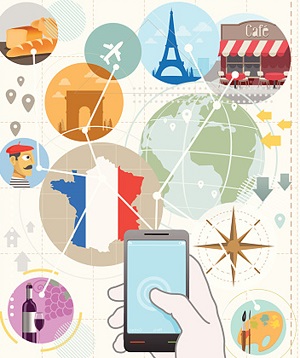
    travel-budget-apps-2

    To enjoy the best of your trip, you need to know some basics about managing your spendings, get away from overspending and stop stressing over money. You can do all of this by creating a travel budget.

    That’s the beauty of the listed travel budget apps below. You don’t have to make the budget manually, you’ll save time and focus on having fun.

    Other features that travel budgeting apps offer is to make it easy packing, navigate your destination, and most of all help you plan your trip by booking good hotels and flights based on your budget to make the vacation stress-free.

    Which Travel Budget Apps should I use?

    We did check more than 50 travel managing apps before writing this article. The list above contains the best travel budget apps, based on several factors like:

    • App size: Some apps need more than 100mb storage space. This list includes only expense apps with less than 10mb size.
    • Privacy: All apps respect your privacy when connected to your bank account.
    • App score: Every app has at least 4/5 customers and user reviews.
    • Functionalities: All apps work offline, and don’t require registration or payment.
    • App Price: The best apps aren’t free. Those who provide true help to travelers can be smaller apps with limited features but still provide great results.
    • App Compatibility: Some apps don’t work on all devices. We made sure to include those working on major devices and on both iOS and Android systems.

    Trabee-Pocket-logo

    Trabee Pocket

    One of the best travel expense apps available in the market; offers great features to help you manage your overall spending habits, you can set a trip budget, share budget reports and organize your expenses by categories.

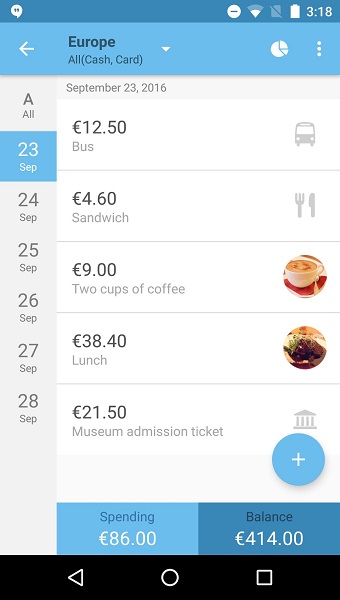
    Trabee Pocket lets you see how much money you spent, and how much you still have in your pocket or bank account. You can also set a budget and make sure not to encounter any financial emergency while abroad.

    This app is a true travel budget manager and tracker. It supports multiple currencies and a real-time converter to check the price in your local currency.

    With the predefined categories that Trabee Pocket provides. You can make multiple budget reports like how much you spent on public transportation, food & restaurants, souvenirs, museums and much more.
    Trabee-Pocket-screen

    The app offers a great option to export the budget reports into CSV and XML files, an easy way to share and save you reports for a better understanding of your spending habits.

    A great option offered by Trabee Pocket is taking pictures, recipes photos, add notes about the spending you made, all of this to easily manage your expenses without blowing your budget.

    Pictures can be for a cup of coffee and where you got it from, or even a picture of a souvenir to remind yourself how much you spent on the road.

    Get Trabee Pocket on Google Play or App Store.
    Spendee-logo

    Spendee

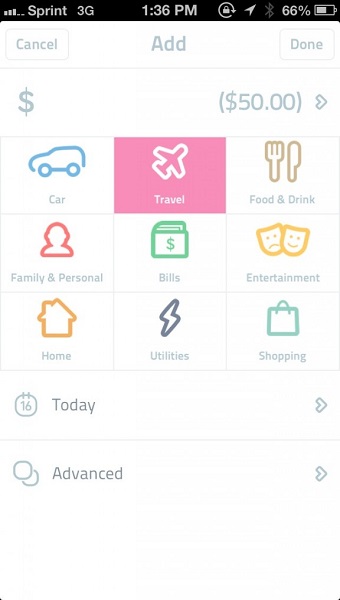
    The app isn’t just a travel expense tracker app, it’ also a travel planning app. It includes some features that help you a lot while planning your trip, by making a saving plan or defining your travel budget before hitting the road.

    Card payment will be available once you connect the app with your bank/card account. So you don’t have to add the expenses manually every time, even if the manual option is available on the app.

    Also, Spendee provides a good feature to help you save money by tracking your income and managing expenses before you go on a trip. It helps a lot when planning your travels.

    Another great feature is the option to add multiple users to manage expenses on one account. They call it shared wallets, a great way to track your spending while traveling in groups or with family.
    Spendee-screen

    The app has its own currency exchange system. The feature requires an internet connection and you can add expenses in multiple currencies. Suitable for those traveling to a foreign country while using a local credit card.

    By using Spendee you can set an overall budget for your entire trip and stick on it, the app will send you notifications if you reach your daily budget.

    Get Spendee on Google Play or App Store.
    Trip-Expense-Manager-logo

    Trip Expense Manager

    The app is 100% Travel related, track every penny while traveling solo or in groups. The app developer said, “I searched Google Play and didn’t find any good travel expenses app that fulfills travelers requirements”. So he/she decided to create an app that is perfect for group and solo travelers.

    Some of the features making Trip Expense Manager one of the best budget apps; are creating multiple trips and managing expenses on one account.

    You can also add places and destinations (sort of a travel bucket list) and write some descriptions or notes for a future visit.
    Trip-Expense-Manager-screen

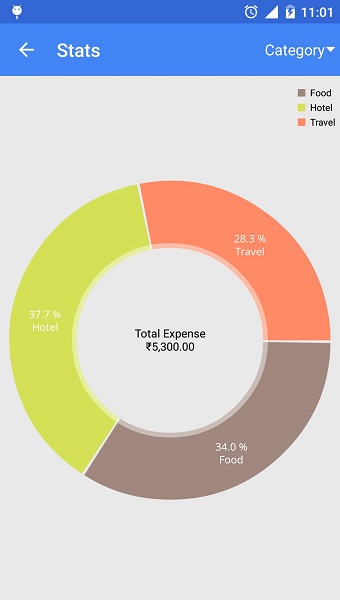
    For group travelers, it’s important to have the possibility to split the bill and calculate travel costs. With Trip Expense Manager it’s possible and you can also share the budget reports with other travel companions.

    The app also provides categories, charts and a currency converter. While the multiple currencies option requires an internet connection to fully work. It can be a very helpful option when visiting multiple countries.

    Get Trip Expense Manager on Google Play.
    TripBudget-logo

    TripBudget

    Another travel-related app is TripBudget, some of the outstanding features are the option to plan a trip based on a fixed budget. You can make trip budget plans before traveling, and track trip expenses when you start your trip.

    A great option offered by TripBudget is the possibility to compare the estimated budget on the same trip by making several versions of a single trip. One of the best features I love about TripBudget while planning any trip or multiple trips at once.

    After you create your trip budget (Plan Mode) you can switch directly to the Spending Mode once your trip begins. Start tracking expenses in real-time and compare with the Budget Plan you already made.

    The app also provides the group travel option, share, split bills and make trip budgets for multiple travels. It can be done on the Plan Mode or while traveling via the Pending Mode by adding other travelers to the group.
    TripBudget-screen

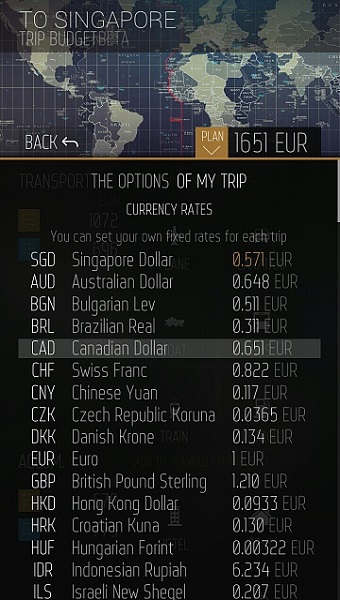
    TripBudget automatically (requires internet connection) converts expenses into/from your local currency. But a good feature with this app is the possibility to fix currency rates for every trip budget.

    Another good feature is that you can add Discounts and Taxes. Those are usually hidden expenses that can ruin your trip budget.

    The best features that TripBudget provides is the GPS localization, used to track expenses from specific locations and destinations. A great feature for travel foodies and those travelers who enjoy exploring new places.

    The TripBudget is totally Free, doesn’t contain ads, and no in-app purchase is required. Even if it’s a Beta version but the functionalities are above expectations and really a must-have app on any traveler’s phone.

    Get TripBudget on Google Play.

    Toshl-Finance-logo

    Toshl Finance

    The app isn’t just a Travel budget app, Toshl Finance is a complete Financial app with a lot of features. Some of them are travel-related and those are the options I’m going to cover regarding this app.

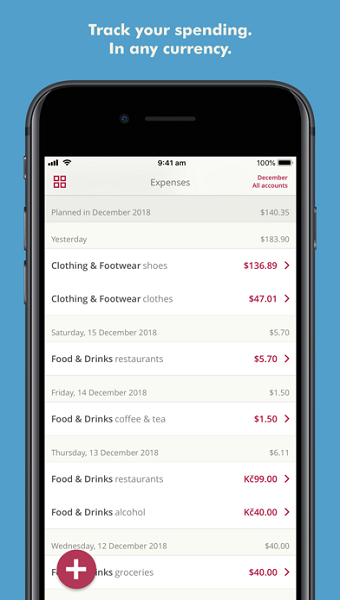
    A great option in Toshl Finance is the possibility to import past transactions, from different financial services (Banks, Cards, Digital Currency). A good feature to check your past trip’s expenses and make sure to prepare an even better budget plan for the next trip.

    With Toshl Finance you’ll be able to access your expenses reports from various platforms using the Toshl web app. As I already said, it’s a complete financial app with various options to choose from.

    The option to connect multiple bank accounts, credit cards, and other financial services is a good feature too. But the best thing is the possibility to connect PayPal and Crypto-Currencies as well.

    The Toshl Finance app is free, but not totally, you’ll get only 2 financial accounts and 2 budgets with the free version, also no photos if you’re not paying for a subscription.
    Toshl-Finance-screen

    The app offers two subscriptions to get unlimited budgets and accounts, also to take pictures (receipts, locations…) and to import transactions from your banking accounts. (Check if your country is supported before downloading the app)

    What makes Toshl Finance the last app on my list, it requires an internet connection for every task, some of the features doesn’t load at all if you’re working offline, not the best feature for travelers.

    Get Toshl Finance on Google Play or App Store.

    Other Travel Expense Apps you may consider:

    I already picked the best travel expense apps I feel more comfortable with, I do travel in Europe and Asia mostly, so for those traveling in the USA and other destinations you can check the above list.

    Those apps aren’t free, contains ads and some of them get very bad reviews when it comes to Privacy Policy (especially when connecting bank accounts) so be careful before using or purchasing any of those travel-related apps:

    Goodbudget

    In order to manage funds, the Goodbudget app is using the envelopes’ concept. First, you’ll have to create a category (envelope) and assign a budget, the category can be for flight tickets, hotel booking or even a package.

    The app is free and gives only 20 envelopes without the subscription, for more, you’ll need to pay for it.

    Goodbudget is available for iOS and Android.

    Travel Budget Tracker

    The best thing about Travel Budget Tracker is the option to work offline in all conditions, very useful for those travelers willing to enjoy a trip without the internet; and only looking to spend their savings without blowing the budget in one day.

    With Travel Budget Tracker you can also create categories, assign a budget and export budgeting reports.

    Travel Budget Tracker is available for iOS and Android.

    Spent

    Spent is an ordinary expense-tracking and budgeting tool. It comes with many features like receipts’ scanning, multiple categories, banking features, and the best feature is the easy interface.

    Another great feature is the cashback program when you make purchases. Still, this option is limited to some countries and a small list of companies to use with.

    Spent is available for iOS and Android.

    Mint

    This app works as a money management tool, can be sync with your bank account to track your income and expenses as well. The manual option is also available in the Mint app.

    Mint app is free, but you’ll have to watch ads, a lot of ads. Also, keep in mind that Mint App works only in the US and Canada.

    Mint is available for iOS and Android.

    Wally

    The Wally app doesn’t have the option to connect to your bank account, so you’ll have to perform all actions manually and enter every single transaction.

    Other good features that come with Wally are location tracking, taking pictures, and of course the currency exchange.

    Wally is available on iOS and Android.

    What’s the best travel app for Business Travelers?
    If you’re traveling for business and you need to justify the business expenses I’d recommend using Toshl Finance, but better using the paid subscription and connecting your bank accounts with the app to get the best of it.

    By using Toshl Finance you’ll be able to take receipts’ pictures, extracting financial data from the bank into the app, and also making spending reports for your business trip.

    Travel budget apps for Group Travel

    When traveling in groups, it’s mandatory to check your budget and the group’s budget, split bills and make sure every member of the team is paying. For this kind of trip, I’d recommend either TripBudget or Trip Expense Manager.

    The first one is more suitable when traveling in groups and planning the trip ahead, the second app will be more helpful if you’re making a one-time group journey between friends or family.

    The most reliable travel app for Currency Exchange
    Any travel budget apps list can’t be complete without talking about the most used and reliable app for currency exchange, I’ll have to add XE to the list because it’s a focused app that gives exact exchange rates in real-time.

    The XE Currency Converter & Exchange Rate Calculator is a free and very trusted app, it provides accurate foreign exchange rates (requires internet connection) in charts and graphs, with options to monitor currencies and get rate alerts.

    XE Currency apps are available on iOS devices, iPad, Android, and even on BlackBerry.

    When using XE it’s better to create an account (Free or Paid) to monitor currencies and get the best mid-market rate when planning your budget trip, you can also use the app offline (saves the last exchange rate) or create a widget on your phone for fast access and live view.

    Bonus: XE provides a Travel App called XE Travel it works like other travel budget apps, but some of the features are missing, I didn’t try it myself on any of my trips.

    What is your favorite travel budget app?

    Travel is about freedom, but it can’t be if you’re spending too much on things that don’t bring so much fun to the trip.

    Also, you don’t have to sacrifice freedom and fun by avoiding things and activities that you’ll enjoy, use one of those apps as expenses tracker to stay on track and make sure every activity has a priority.

    We’d like to know which expenses tracker you like, head over to the comment and share your experience or ask questions and will try our best to help you.

    RESOURCES:

    1. https://smartlemur.com/best/apps/budgeting
    2. https://www.wanderingeducators.com/best/traveling/7-travel-budget-apps-keep-spending-in-check.html
    3. https://bemusedbackpacker.com/2016/02/02/top-budget-apps-for-travelling/
    4. https://matadornetwork.com/read/9-best-budgeting-apps-travelers/
    5. https://toomanyadapters.com/best-budgeting-expense-tracking-apps-travel/
    6. https://www.translateshark.com/blog/top-travel-budget-apps/
    7. https://money.usnews.com/money/blogs/my-money/articles/2017-05-31/5-best-travel-budget-apps-to-download-for-your-next-vacation
    8. https://www.guidingtech.com/travel-expense-apps-android/
  • Top 5 Best Travel Navigation Apps for Android and iOS

    Top 5 Best Travel Navigation Apps for Android and iOS

    Whenever you’re traveling by vehicle, hiking or just wondering in a new city, it’s mandatory to pack a pair of shoes, but for me it’s more important to have a reliable GPS app to show you the way around, especially if you’re visiting a new place where locals don’t speak your languages. This is why I thought about writing an article about Travel Navigation Apps.

    I already published an article where I showed people which travel translation app to get in order to break the language barrier when visiting a non-English country, you still need a reliable travel navigation app to show you the road when planning your travels.

    Today’s post is about the best GPS apps any traveler should have, make sure to try those apps in your own city, in other words locally. Then scale it and pick the one that works the best for you.

    I personally try the navigation app locally, then I increase the navigation diameter by traveling less than 50 km in another city that I didn’t visit before; all this to make sure that the mentioned features work and the app is really something I can count on.

    The Top Travel Navigation Apps used by travelers

    Let’s start by listing those 5 Top travel navigation apps, used by travelers all around the world.

    1. Maps.Memapsme-app

    One of the best apps, personally this one help me a lot, it’s accurate 99% (the 1% time where it got me truly lost, but because I was challenging the system).

    The app is available for both Android and iOS.

    Maps.Me has its own cartographic mapping system, something that other navigation apps don’t, it stand out for various features that I can shorten here:

    Maps.Me travelers’ features

    • Offline maps: works without the internet to save on data roaming.
    • Offline navigation: over 70 million points of interest.
    • Spoken turn by turn directions that works offline
    • Update the maps via OpenStreetMap
    • Map editor: an open-source where everyone can edit, add, recommend a place.
    • Travel guides: over 600 cities around the world
    • Bookmarking locations
    • Location sharing with so many options
    • An offline full-featured search function that includes: POIs, places, hiking trails, ATMs Restaurants and Hotels, and much more.
    • In-app hotel bookings directly and sightseeing tours booking using Aviator.
    • Traffic data
    • Voice navigation
    • Re-routing calculation
    • Navigation modes: driving, walking, public transit, and cycling.
    • Public transportation: the app works using Uber database
    • Completely free, no in-app purchases or download limits (according to the developers the maps and features will be free forever)

    Also, Maps.me tend to progress and update the maps every 2-4 weeks, by including new places and recommendations, the features also get updated every now and then.

    After installing Maps.ME you should consider connecting via Wi-Fi (prior to your travel preferably) and download the desired maps, the app is designed to work offline, so without maps, you can’t go anywhere.

    One of the best features in Maps.me, it doesn’t require a lot of data storage on your phone, with less than 200 MB you can install the app with several maps and hit the road.

    For example, and compared to Google Maps, the New York map on Maps.ME will require only 71 MB, when o Google Maps it’s more than 280 MB, do the math.

    On Maps.ME you can get something special, buildings are marked with street numbers, roads have both official names and local names. So it’s something you really need when traveling and trying to find a specific location.

    Another great feature (personally I use this one a lot) is local places, on Maps.ME you’ll be able to find non-touristy locations and things to do in your destination, some streets are already marked as Sightseeing, and other hidden gems were added by locals and tourist just like you.

    So the only thing you need to do, go and bookmark those places and POIs for your next trip. You can also import, export or share the bookmarks you made with friends or send via email.

    1. Google Mapsgoogle-maps-app

    Google Maps is the n°1 travel navigation apps on all platforms, its speed and functionalities over rank other apps in many ways, and the app comes pre-installed on Android phones.

    The app is available for both Android and iOS.

    But still, Google Maps sometimes will get you lost intentionally. The developers set some parameters to suggest new roads for you.

    In other words, you’ll be lost and the app will try to find the best road for you. They call it data-rationing, Google it to find out more.

    They do implement this function in order to update their database and to make sure the roads they suggest truly work and can reach better ETA.

    Google Maps travelers’ features

    • Offline maps: heavy storage needed.
    • Offline searching: the best search you can get on a navigation app.
    • Turn by turn directions
    • Street-level photography: something every traveler need when planning a trip.
    • Multiple location views: street view, satellite imagery, and panoramic view.
    • Updated maps via OpenStreetMap
    • Bookmarking locations: includes the option to share and import/export bookmarks.
    • Traffic data: available in some locations and requires internet.
    • Public transit options: timings, stops, metro status…
    • Completely free with no in-app purchases
    • Almost Ads free: some ads will show up for hotels, tourist attractions…

    When traveling to a less-visited place or destination, Google Maps directions aren’t guaranteed, you can get lost easily, especially if you’re navigating offline.

    Google Maps works great using the internet, so when traveling it can be really expensive using data roaming, better to try an alternative if you’re looking for a free navigation app that provides free features where no data needed.

    In conclusion, Google Maps is pretty useful when traveling abroad, it makes transportation something you’ll enjoy.

    Keep in mind that you need to download the map before visiting your destination, it requires a lot of storage space on your device, but you can only download an area of interest and not the whole city map. Another thing to consider, the cached maps expires in 30 days, so make sure to update/download the maps just before hitting the road.

    1. OsmAndosmand-app

    The OsmAnd app is really functional, yes limited, but with various features that you can use most if you’re traveling by car, it doesn’t provide a lot of transit and transportation routes, but when driving it will suggest good plan to make the trip easy, less traffic and enjoyable.

    The app is available for both Android and iOS.

    OsmAnd is suitable for a drive, cycle or walk. It has several maps for different travel types and trips.

    You can download OsmAnd for Android and iOS, the app works on phones, tablets and on Vehicle GPS Units like Garmin and TomTom. Check the OsmAnd official website to discover more features and functionalities.

    Note: The app is not completely free, there are some features like downloads limits and the OSM function that need to purchase to fully use the app.

    OsmAnd Features for travelers

    • Offline maps
    • Turn-by-turn navigation
    • Offline search
    • Maps for things other than driving
    • Uses OpenStreetMap resources (Vector maps and Prepared maps)
    • Favorites
    • Driving region: this will setup auto driving settings (length unit, driving side…)
    • Local Names or Name Transliteration for the place
    • Right-hand or left-hand driving
    • Several units of length (kilometers/meters, miles/feet, or miles/yards)
    • Voice guidance Navigation using TTS voice (multiple languages)
    • Trip planning by recording tracks, planning your course or making a route prior to travel.
    • OSM Public Transport (requires an internet connection, doesn’t work offline)

    The app has multiple map styles, some of them are unique like Nautical Map, suitable for sailing by showing ports, sailing routes, and navigation lights.

    Also the winter and ski style that helps a lot when navigating on winter sports locations, or when planning your next ski holiday by showing any skiing pistes available in the area.

    Also, the Overlay / Underlay feature is outstanding, it provides you with a Hike Bike and Cyclemap (cycling routes) layers among many others.

    The option to view POI along the road is really helpful for tourists, especially if you’re a solo traveler and want to discover a city on your own.

    In order to keep the app fresh, developers made it easy for people to contribute by adding new items to the map like POIs and Sightseeing locations.

    1. SygicSygic-app

    The first time I got this app on phone, I thought it’s just another navigation app, all features seem to be same, but when I did my 50 km trip to try more of the app, I just found that Sygic isn’t fully functional, it’s not as fast as other apps and sometimes you need to restart your device to make it work again.

    The app is available for both Android and iOS.

    Sygic Features for travelers

    • Offline maps (uses TomTom maps)
    • Turn-by-turn feature
    • Voice-guided directions (comes with a voice-spoken street names option)
    • Alternate routes
    • Speed limit display
    • Real-time traffic updates (require internet, only for premium versions)
    • 360° videos for some POIs
    • Tourist places: provides true travelers with information about the place.
    • Travel Planner feature (favorite places, itinerary planning, travel guides)

    One of the best features that Sygic provides is the exact location for POIs. In addition, it gives you some descriptions about the touristy place, pictures, and videos, also it provides the opening hours (museums, theaters, restaurants…) with the admission fees and contact information about the place.

    The apps come with an online travel planner using various interactive tourist maps. With so many tours options, sightseeing tours, hotels, restaurants, and many others.

    The Sygic travel planner gives you the freedom to build a day-by-day itinerary, add things to do while planning your trip, all without spending so much on data roaming fees.

    Another powerful feature from Sygic is the Sygic Travel Maps, it’s can be downloaded separately and used to plan your trip with detailed maps and various travel guides (over 10 000 locations), this is why Sygic is one of the best travel apps available.

    1. HERE WeGohere-wego-app

    I stay preserved on this one, can’t say it’s good or not, as I never try it in the real world. Yes I did some trips using this app, but to be honest, I don’t trust the roads where it says it will give shortcuts. Why? because the maps included are way too old to be trusted.

    The app is available for both Android and iOS.

    Besides that, the app is a perfect choice for travelers, maps aren’t heavy and the app is fast (they call this option rendering) so you’ll be able to use it offline or online without noticing a difference in its functions.

    Another feature to point is the easy to use and beautiful interface, nothing too complicated, that makes it one of the best travel navigation apps.

    HERE WeGo Features for travelers

    • Offline maps (more than 100 countries)
    • Mapping options (download neighborhood, city, country, or continent maps)
    • Traffic information (depends on the location)
    • Public transit maps
    • Collections or favorite places (saving POI for quick directions, custom itineraries)
    • Map creator app: can easily make changes and adjustments to a map.
    • Public transportation (ticket prices, more than 1,300 cities around the world)
    • Train and bus timetables (timings and prices of bus/subway tickets, taxi fares)
    • Multiple route options (car, bike, pedestrian, taxi, and public transportation)
    • In-car navigation: the Drive Mode that includes road types, speed limit, traffic information, gas stations, and traffic hotspots.
    • Voice/walk guidance: without a data connection, the feature works offline.

    The HERE WeGo app is perfect for Bikers, as it offers a handy guide about the terrain, it also explains (graphically) how flat or hilly the bike ride will be.

    If you’re traveling by foot, hiking or even riding a bike, this app is definitely a good option to consider.

    The only thing I don’t like about HERE WeGo is the driving mode, it doesn’t provide good information and recommendations regarding the exits or when driving on highways.

    Q&A about the Travel Navigation Apps

    Let’s take a look at those most common questions asked by travelers when looking for the est travel navigation apps:

    What are the best apps for foodies?

    The best GPS app that provides details about restaurants and the how to find a good place to eat is Google Maps, with so much information about food places nearby, you can choose the best restaurant based on your budget or health style.

    What are the best travel budget apps ?

    We already made an article talking deeply about the best Travel Budget Apps for both iOS and Android, check the list and pick the one that suits your need.

    What are the best public transit apps?

    Any traveler will prepare a plan for transportation when in the city, but can’t make sure every plan works a 100%, sometimes you need to improvise and find alternatives,

    So the best app to help you choose which public transit will be Google Maps as it provides a lot of data and information regarding Metros, Subways, Trains, and Buses. Also provides good rate if you’re willing to book a cab or try to use Uber services.

    What is the best GPS app for bicyclists ?

    If you’re visiting a country where bicycles is widely used, like Amsterdam for example, you’ll need to install Maps.ME on your phone, it shows all bicycles’ routes and maps. This can be really helpful to save time when wondering a new city by bicycle.

    What are the best apps for outdoors/hiking?

    Most hikers have a GPS on their smart watch, so the best app for outdoors travel will be Maps.ME as it can be easily installed and configured on both phones and Wear OS.

    Top-Best-Travel-Navigation-Apps

    That’s all for today, I hope you enjoy your next trip, don’t forget to can try those apps on your own. Feel free to suggest any other app you already know about and you feel it can make it to this list.

    All those travel navigation apps are supposed to work on all operation systems: Android and iOS. Some of them will work on your Smart Watch, In-Dash systems. Make sure the app works the same on your phone as on other devices you have.

  • Top 3 Travel Translation Apps (Offline and Online)

    Top 3 Travel Translation Apps (Offline and Online)

    When traveling abroad for leisure or business, communication in a country speaking a foreign language is a must. This is why you definitely need to have one of those Travel Translation Apps.

    UPDATE: Apr 11, 2019

    It doesn’t matter if you’re using iPhone or an Android smartphone, having some tools on your phone while boarding an international flight will help you communicate, ask about directions even if the you’re asking someone that doesn’t speak English.

    Even if you can fly solo and try to look for directions using a travel navigation app, sometimes you’ll need to ask a specific questions, or look for a place that you can’t find on your GPS app.

    For example you’re a vegan and want to ask about a vegan-friendly restaurant, at least you can approach a local and ask for the best restaurant using their local language.

    We’ll show the list of the Top 3 Travel Translation Apps need on every traveler’s phone, you can download all of them when planning you’re trip.

    After downloading the translation app try every single one to choose the best based on your language translation preferences and your travel style.

    Best Translation App you need on your phone. (Android or iOS)

    Here are some of the translation apps for travel you should get when planning your trips:

    Travel Translation Apps for iPhone

    1. iTranslate Voice 3iTranslate_Voice_App

      iTranslate Voice is a professional translation app that uses voice to voice translation technology. You’ll just need to type or say the word and it will say it in the foreign language from the list.

      N.B: iTranslate Voice isn’t the same app as iTranslate which also provide good features, but not really a Travel App, so check which one you’re downloading.

      Unfortunately this app is available only on iOS system, none on the versions is available for Android for now.

      The App is now available for both Google Play (Android) and on iTunes (iOS)

    2. Microsoft TranslatorMicrosoft_Translator_App

      With Microsoft translator you have the option to take a picture of the word to get the meaning in English, it also have the possibility to work with smart watches for both iOS and Android.

      Also a Free tool works on Browsers, Android and iOS. Mostly used by travelers with   Windows Phones.

      Microsoft Translator support only 54 language for the moment. (The word “Only” is used because other apps support over 100 languages)

      The best thing about Microsoft Translator is the real-time speech translation, and 44 languages works on the offline mode (you need to download Offline Dictionaries)

      Microsoft Translator Features:

      • Text: Typing texts on your phone and getting translations.
      • Speech: Use the microphone to translate what you say in real-time.
      • Photo: Taking picture with texts and translate instantly.
      • Conversation Mode: (best feature) the app can translate a speech between two peoples speaking in real-time.
      • Offline Mode: You can use all of those features without using internet connection.
    3. Google TranslateGoogle_Translate_App

      The most easy one is Google Translator everyone know it, everyone know how to use it. Just type the word or say it to get a live translation in English. It’s a FREE translation tool works on several devices and browsers, also on iPad Tablets, Android and iOS.

      Google Translate has over 100 language, but not every language have all the features (voice, pronunciation…). When a language is available, the app guarantee to translate text but not voice translation or images.

      Make sure to check your language support on all Apps before taking your trip. Also Google have the option to Translate Real-Time Video.

      Keep in mind that you can use Google Translator in “offline mode” You’ll we need to download the app and download the Offline Dictionary for both spoken languages you’ll be using. For example if you’re planning a trip to Russia, you should download the Russian and English dictionary.

      Google Translate Features:

      • Type: Typing texts on your phone and getting translations.
      • Write: Scribbling words and phrases on the screen.
      • Talk: Use the microphone to translate what you say in real-time.
      • Snap: Taking picture with texts and translate instantly.
      • Offline Mode: You can use all of those features without using internet connection.

    Which Travel Translation App I use personally?

    We didn’t share this article in order to promote any of those products, we use all of them depending of the visited country, for example when traveling to Arabic countries, and we’ll be using Google Translator. When heading East to Asia we prefer Microsoft Translator.

    For people speaking multiple languages (Latin and others) you can try yourself and choose the best App for the target language. It depends also on your phone version and system.

    As I already tried some of those Translation Apps, I think (and it’s my personnel opinion) those Travel Apps working offline are the best choice. This is why this list includes apps that doesn’t require internet.

    Why? because when traveling you don’t need to look for internet connection in order to make a discussion, so when the translation app uses offline database, you can request a translation anytime anywhere.

    What is the most accurate translation app?

    most-accurate-translation-appAll language translation apps have similar features, but in order to pick the best app you need to try it first, sometimes you can’t find the desired language or the app isn’t available for your smartphone system.


    Simply, download those apps available in the list above, and I’m sure you’ll find the best travel app you need.

    Travel Phrasebook Apps

    accessible_travel_phrasebookBeside travel translation apps you can try travel phrasebooks, those are guides an English speaker can use to communicate with locals, and you’ll not learn Grammar or translate a complete phrase.

    FREE Bonus: Try the link below to Lonely Planet, where you can get a free eBook entitled: Accessible Travel Phrasebook.

    Anyway, don’t forget learning some words before travelling overseas, we already made an article about Russian Words when travelling to Russia.

    Pro Tip: Sometimes it’s better to learn a language using book (yes, paper books still exist) for example download a Travel Phrasebooks, print it out and put it in your luggage for your next travel, really helpful for long trips.

    We’ll be making other articles about Arabic, French and Spanish (which I speak fluently and feel more comfortable writing about).

    If you have any requests or need to ask questions please visit the Contact page. Also if you already know some apps or willing to participate writing an article on our website, feel free to refer to our Guest Post page.